Color theme
Sign inRequest beta access

ClickGuardIQ platform

Watch measured activity arrive with freshness in view.

See near-real-time visitor activity, risk signals, and tracking context without confusing a live stream with complete historical analysis.

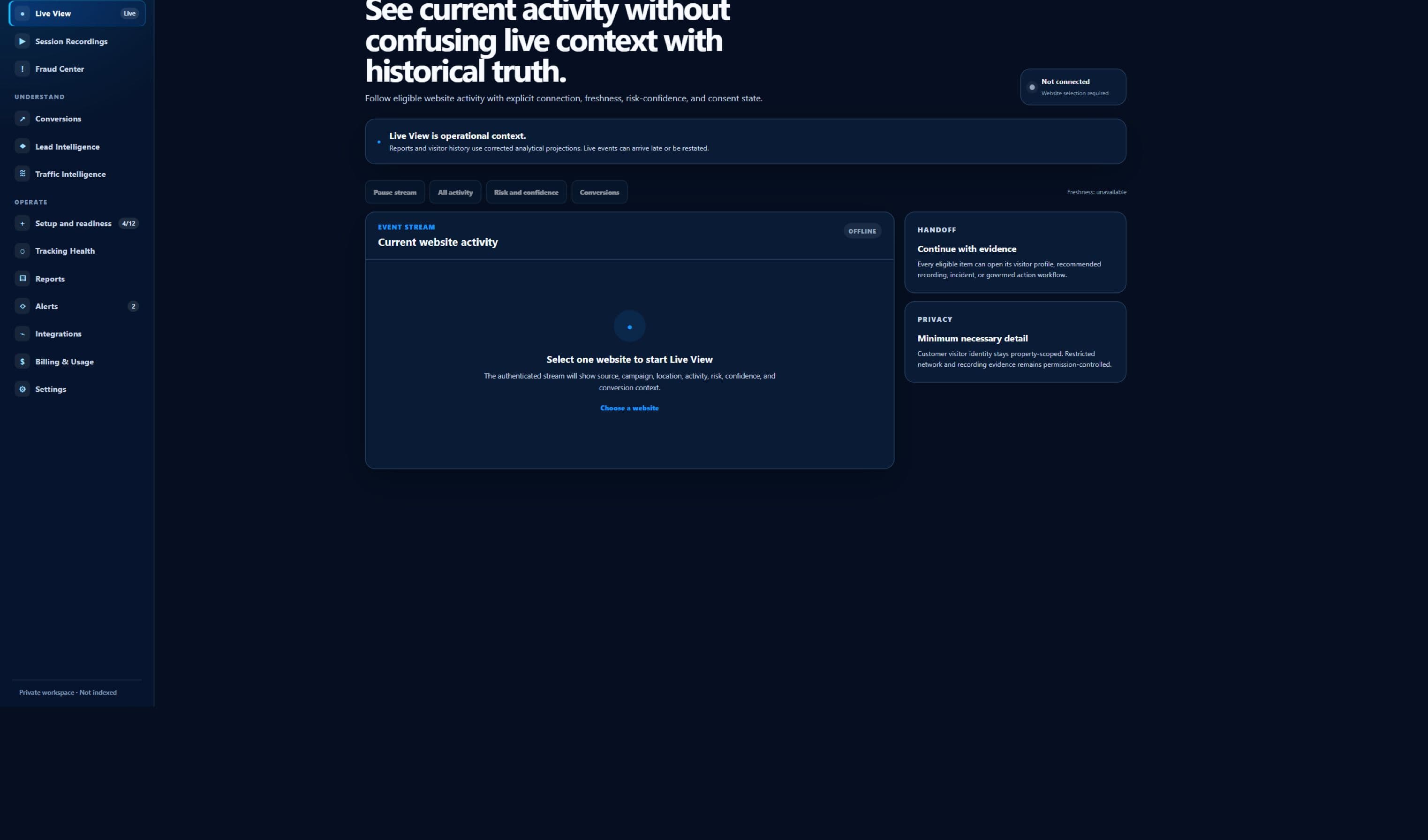
Sanitized beta interface — no customer data
Sanitized ClickGuardIQ Live View interface showing its current setup state.
Live ViewCurrent beta interface; the capture does not imply that a live customer stream is connected.

A clearly owned job

Live View has one defined place in the operating model.

The page explains what this surface measures, the decision it can support, and the boundary it does not cross.

The job this surface owns

Live View is designed for operators who need immediate awareness of eligible measured activity without mistaking a recent stream for complete analysis. Its primary record is a freshness-labelled stream of website activity with acquisition, device, page, event, visitor, tracking, and eligible risk context. That focus matters because a useful operating surface should answer a specific question before it asks a team to act. Here, the question is whether a recent event deserves a deeper visitor, session, incident, or tracking-health investigation. The answer stays attached to the evidence and scope that produced it.

Live View is bounded by the selected website, current stream window, accepted event types, consent and sampling rules, ingestion state, and disclosed delay. That scope travels with summaries, filters, exports, and follow-up links so a number is not separated from the population it describes. When the required evidence is absent, the interface should say that the answer is unavailable or incomplete instead of replacing it with an estimate that looks authoritative.

  • Primary record: a freshness-labelled stream of website activity with acquisition, device, page, event, visitor, tracking, and eligible risk context
  • Decision supported: a recent event deserves a deeper visitor, session, incident, or tracking-health investigation
  • Designed for: operators who need immediate awareness of eligible measured activity without mistaking a recent stream for complete analysis

A deliberate evidence boundary

A live stream shows what has arrived recently; it does not guarantee complete capture, completed sessionization, final scoring, historical comparability, or fraud confirmation. ClickGuardIQ preserves this distinction because a high-risk signal, an unusual pattern, a tracking defect, and confirmed invalid activity are not interchangeable findings. Each can change what an investigator checks next, but none should silently inherit the certainty of another.

Each eligible event can retain the visitor, session, source, validation, and signal references needed for a stable follow-up after the stream moves on. The operating record keeps source observations, calculated signals, human notes, decisions, provider responses, and verified outcomes attributable. Corrections create a history rather than rewriting the earlier state, which keeps later reporting and review understandable.

How it fits daily work

The interface distinguishes event time, receipt time, processing time, current stream delay, and the point where older activity belongs in historical views. This prevents a recent partial stream from being compared casually with a completed historical period. It also gives an operator a direct route to the underlying visitor, session, incident, conversion, lead, campaign, integration, or delivery record when more detail is justified.

Live activity can expose sensitive URLs, events, and acquisition context, so access, field display, masking, and client scope follow the selected website and role. Access is therefore part of the product model, not an afterthought. Sensitive evidence, exports, provider actions, and administrative changes should remain limited to the appropriate website, client, role, and purpose, with an audit trail that explains who did what and when.

Feature detail

What Live View is designed to help teams do.

Each capability keeps its underlying scope and limitations visible so convenience does not come at the expense of explainability.

See freshness explicitly

Display stream delay, last accepted event, processing state, and historical handoff so recent activity is never implied to be fully reconciled.

Filter useful event types

Narrow activity by website, source, event, page, device, location, validation, or eligible signal while retaining the active stream window.

Inspect tracking context

Expose validation failures, missing identifiers, consent state, duplicate behavior, and ingestion warnings separately from visitor risk.

Learn more →

Open the measured visitor

Carry the event and property context into Visitor Intelligence instead of forcing an operator to search for a moving record.

Learn more →

Continue to session evidence

Hand eligible activity to the processed session or recording workflow when the question requires sequence, behavior, or page-level review.

Avoid alert fatigue

Use explainable eligibility and policy to surface meaningful recent changes rather than turning every unusual event into a high-severity alarm.

Working situations

Use it when the next question needs evidence, not a guess.

These workflows describe practical investigation and operating needs; they are not promises of a particular savings, detection rate, or commercial result.

Validate a new installation

Confirm whether permitted events arrive, validate, and link to the selected property while treating live visibility as one readiness check rather than complete certification.

Watch a campaign launch

Observe early acquisition and event context with a visible delay, then move to historical Traffic Intelligence before comparing performance.

Triage an active anomaly

Inspect recent sources, pages, devices, validation state, and eligible signals, then open the stable visitor or incident record for the actual investigation.

Confirm recovery

After a tracking repair, watch accepted events resume while Tracking Health verifies loss, backlog, delay, and the last trustworthy historical boundary.

A governed sequence

From a freshness-labelled stream of website activity with acquisition, device, page, event, visitor, tracking, and eligible risk context to a defensible next step.

The workflow keeps observation, calculation, review, action, and verification separate so uncertainty and responsibility remain visible.

  1. 01

    Accept eligible events

    Receive property-scoped events with consent, source, event time, receipt time, identifier state, and validation metadata.

    Visible arrival does not prove complete collection.
  2. 02

    Validate and label

    Identify rejected, duplicated, delayed, sampled, or incomplete activity and prevent it from entering the stream as ordinary trusted evidence.

  3. 03

    Add current context

    Attach known acquisition, visitor, device, page, tracking, and versioned signal context without waiting for unfinished historical calculations.

  4. 04

    Recommend the next view

    Route a meaningful event to Visitor Intelligence, a session, a recording, Fraud Center, or Tracking Health with the current scope preserved.

  5. 05

    Hand off to history

    Move events beyond the live window into reconciled historical views and disclose when later processing changes their current interpretation.

Evidence and readiness

Understand the current product boundary before connecting traffic.

ClickGuardIQ is presented as a beta product. Interface evidence is sanitized, provider-dependent capabilities require validation, and unsupported proof is not substituted with generated claims.

Public captureavailable

Sanitized Live View state

The product image shows the current setup boundary without implying a connected customer stream or live incident.

Freshness modelbeta

Delay remains visible

Event, receipt, processing, and handoff times are part of the model; production latency depends on the connected setup.

Stream completenesslimited

Not a historical report

Late arrival, validation, sampling, consent, and downstream reconciliation can change the later complete population.

Real-time claimsplanned

No instant-blocking promise

The page does not claim that observing an event automatically confirms fraud or completes a provider protection action.

A more useful comparison

Evaluate Live View by its operating behavior.

This table compares two operating approaches. It does not claim that every alternative product follows the same design or lacks the same controls.

Evaluate Live View by its operating behavior.
ComparisonUnqualified activity feedFreshness-aware Live View
TimeShows one timestamp without stream delay or processing state.Distinguishes occurrence, receipt, processing, current delay, and historical handoff.
CompletenessRecent visible activity can be read as the complete current population.Discloses validation, sampling, exclusions, late arrival, and reconciliation limits.
RiskTurns unusual activity into an immediate fraud label.Shows eligible reasons and routes the record to a stable investigation before a decision.
TrackingMixes malformed or missing data with poor traffic quality.Keeps collection health and visitor risk as independent diagnoses.
Follow-upThe item disappears as the stream advances.Carries an attributable event into visitor, session, incident, or health evidence.

The ClickGuardIQ operating standard

Context remains attached from first observation to final review.

Three controls make the page useful for investigation, governance, and later audit without turning one screen into an unsupported verdict engine.

Scope, eligibility, and freshness

Every important result in Live View should identify the website or client boundary, time range, timezone, filters, eligible population, excluded population, and last successful update. The interface distinguishes event time, receipt time, processing time, current stream delay, and the point where older activity belongs in historical views. A result that cannot disclose those conditions should not be used as if it describes the whole account.

Eligibility is especially important when consent, sampling, integration coverage, event validation, identity state, or provider availability changes what ClickGuardIQ can measure. The interface should reveal those gaps at the point of use and preserve them in reports or exports. That makes an incomplete answer operationally useful without pretending it is complete.

Reasons, versions, and corrections

Each eligible event can retain the visitor, session, source, validation, and signal references needed for a stable follow-up after the stream moves on. Calculated outputs retain their model, rule, or score version and the eligible evidence available at calculation time. A later recalculation is a new state with a reason, not a silent edit to history. Operators can therefore distinguish what the system observed from what it inferred and what a person later decided.

The same discipline applies to corrections. Identity merges, conversion reconciliation, qualification changes, incident decisions, and provider responses may alter a current view. ClickGuardIQ should keep the earlier record attributable, show the correction source, and rebuild affected summaries from governed records rather than from an unexplained overwrite.

Permissions, actions, and proof

Live activity can expose sensitive URLs, events, and acquisition context, so access, field display, masking, and client scope follow the selected website and role. A recommendation is not an attempted action; an attempt is not a provider-applied change; and an applied change is not a verified outcome. Those states remain separate wherever this surface can contribute to protection, notification, export, or downstream delivery.

This page does not use invented testimonials, customer logos, benchmark statistics, or savings percentages as product proof. The product image is either a sanitized beta capture or clearly labelled conceptual artwork. Commercial evaluation should instead begin with fit, data readiness, provider capability, policy requirements, and the evidence a team needs to verify its own outcome.

Live View questions

Clarify the boundary before making a decision.

These answers describe the intended beta operating model and avoid claiming an integration, outcome, or automation that has not been validated.

Is Live View truly real time?

It is designed as a near-real-time operating view with disclosed delay, not a zero-latency guarantee. Network delivery, consent, validation, processing, reconnects, and environment conditions can affect when an eligible event becomes visible.

Does an event in Live View mean tracking is fully installed?

No. One visible event confirms only that particular event reached the current path. Tracking Health must still evaluate expected coverage, identifiers, validation, duplication, loss, delay, consent, and recovery across the property.

Can Live View confirm click fraud immediately?

No. Recent activity can contain eligible signals or unusual patterns that warrant review. Fraud confirmation requires a stable evidence set, reason and confidence context, investigation, policy, and an attributable decision.

What happens when an event leaves the live window?

It should remain available through the appropriate historical visitor, session, traffic, conversion, or incident record after processing. The live item and historical result may differ when late or corrected evidence arrives.

Can users open a recording from Live View?

Only when recording was lawfully enabled, the session is eligible, capture and processing succeeded, retention still applies, and the user has permission. Live activity alone does not guarantee that a replay exists.

Can the stream be exported?

A governed historical export is generally more reliable than treating a moving live window as a fixed dataset. Current beta export behavior, fields, permissions, and stable snapshot requirements should be reviewed for the intended use.

Evidence before activation

Check the stream questions your team needs to answer safely.

Describe the websites, event volume, required delay, consent controls, investigation handoffs, and sensitive fields. The beta review will clarify current stream and historical boundaries.