Color theme
Sign inRequest beta access

Connected workflow

Capability directory

Connect the tools around your traffic-quality workflow.

The integration directory distinguishes planned, connected, healthy, delayed, and unavailable capabilities so configuration is never mistaken for successful data flow.

Sanitized beta interface — no customer data
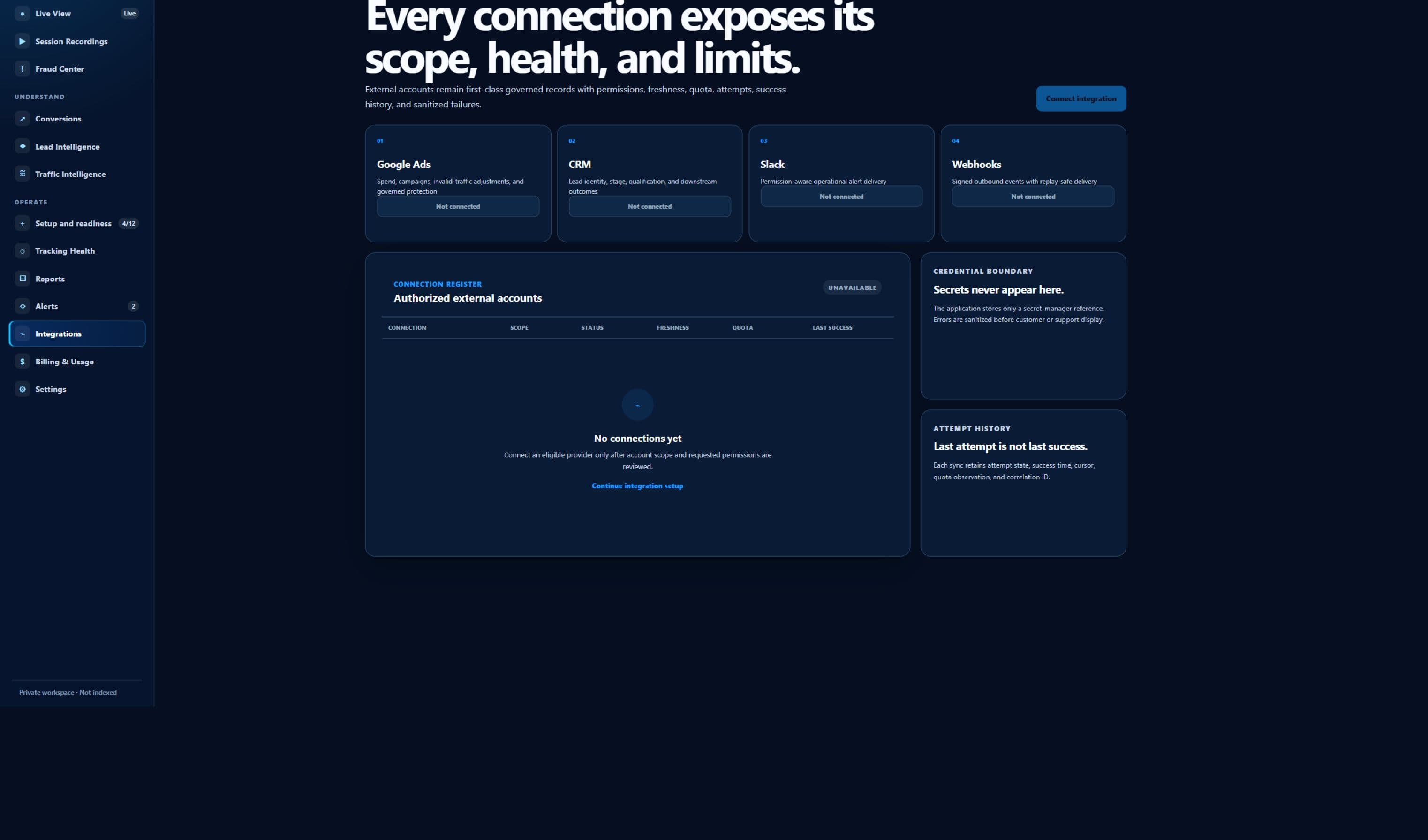
Sanitized ClickGuardIQ Integrations workspace showing provider readiness and setup boundaries.
IntegrationsCurrent beta interface; the capture does not claim a completed provider connection or verified action.

Capability before connection

ClickGuardIQ Integration Directory is described by capability and verified state—not by logo presence.

The page separates what ClickGuardIQ documents or supports from what requires credentials, provider behavior, customer configuration, and observed data flow.

The integration job

The directory identifies which connection families are documented, planned, in beta, externally controlled, limited, connected for a specific account, degraded, unavailable, or verified for a named capability. This page is designed for buyers, administrators, developers, agencies, privacy and security reviewers, and operators mapping the tools around traffic-quality work. Its current public status is a capability directory with explicit provider-readiness states, which remains visible beside the setup and operational workflow.

The provider or destination boundary is each named provider, customer system, deployment environment, or approved destination remains authoritative for its own accounts, permissions, fields, APIs, limits, delivery, application, and availability. A directory listing, plan entitlement, configured credential, successful authorization, enabled toggle, or published tag is not evidence that the complete workflow is connected, healthy, current, or verified.

  • Current status: a capability directory with explicit provider-readiness states
  • Audience: buyers, administrators, developers, agencies, privacy and security reviewers, and operators mapping the tools around traffic-quality work
  • Provider boundary: each named provider, customer system, deployment environment, or approved destination remains authoritative for its own accounts, permissions, fields, APIs, limits, delivery, application, and availability

Scope and permissions travel with the connection

Every connection belongs to an organization and, where relevant, a client, verified website, provider account, destination, environment, credential, capability set, and permitted purpose. Credentials, tokens, secrets, account identifiers, client or website assignments, capability grants, consent, and permitted fields must remain scoped to the minimum authorized purpose.

The directory exposes capability and operational state without publishing credentials, secrets, customer account data, payloads, personal data, or sensitive provider responses. Setup, refresh, permission change, disconnection, administrative access, sensitive field use, delivery attempts, and other material operations should produce attributable audit history without exposing secret values in public pages, routine logs, alerts, or exports.

Operational state is evidence

A useful directory separates configuration, authentication, permission checks, synchronization or delivery, provider response, expected freshness, recent error, retry or recovery, and capability-specific verification. Connection health should identify the latest meaningful source and destination state, the time it was observed, expected freshness, current delay, error or limitation, retry or recovery status, and affected capability.

A plan can include an integration workflow while a particular provider connection remains unconfigured, unauthorized, unsupported for one capability, delayed, degraded, or unavailable. When the product cannot verify a field, permission, data flow, provider response, downstream receipt, application, or reversal, the honest state is planned, configured, delayed, degraded, failed, unavailable, unknown, or externally controlled—not connected or successful by inference.

Capability model

What a responsible clickguardiq integration directory path must preserve.

Capabilities are stated as bounded product and operational behaviors. They do not imply partnership, universal provider support, live customer data, or guaranteed outcomes.

Publish a status legend

Define documented, planned, beta, configured, connected, healthy, delayed, degraded, failed, unavailable, external, and verified states in plain language.

Separate capability status

Report reads, writes, actions, verification, webhooks, imports, exports, alerts, fields, accounts, and destinations independently rather than one integration-level badge.

Preserve scope

Bind credentials and capabilities to the minimum organization, client, website, provider account, destination, environment, role, field, and purpose.

Expose operational evidence

Show safe authentication, permission, sync, delivery, callback, provider, freshness, error, retry, recovery, and last-verified context without exposing secrets.

Document external ownership

Identify which fields, states, limits, policies, delays, outcomes, and recovery actions remain controlled by the provider or customer system.

Route to implementation detail

Connect each listing to setup prerequisites, schemas, permissions, capability matrix, health meaning, limitations, security, privacy, and contact review.

Operational situations

Use explicit state when setup, delivery, and provider behavior disagree.

These scenarios focus on failure visibility, safe recovery, scope, and verification rather than presenting a frictionless fictional connection.

A plan includes an integration

Confirm that entitlement, documentation, current product status, account capability, credentials, permission, configuration, data flow, and verification are still separate.

One capability is healthy and another fails

Display capability-specific states, scope, last success, expected freshness, error, retry, and provider dependency instead of changing the whole integration badge.

A provider changes permissions

Revalidate affected accounts and capabilities, stop unsupported operations, surface degraded or unavailable state, preserve history, and request the minimum new authorization if required.

A connection is removed

Stop new reads or deliveries, revoke or rotate credentials where appropriate, identify in-flight work, preserve permitted audit history, and apply retention and deletion rules.

Connection lifecycle

Five stages of a governed clickguardiq integration directory workflow.

Every stage retains account or destination scope, capability, actor or system, time, status, limitation, and the evidence required to progress or recover.

  1. 01

    Choose the required capability

    Name the business workflow, data direction, provider or destination, accounts, websites, fields, operations, verification, freshness, and recovery needs.

    Selecting an integration name does not prove the required capability is implemented or available for the target account.
  2. 02

    Review current readiness

    Check public product status, documentation, external ownership, provider prerequisites, permissions, limits, privacy, security, and known unsupported requirements.

  3. 03

    Authorize and configure scope

    Use minimum credentials, bind organization, client, website, account, destination, environment, fields, purpose, capabilities, and administrative ownership.

  4. 04

    Test data flow and health

    Validate schemas, attempts, provider or receiver responses, freshness, errors, retries, partial results, reconciliation, observability, and safe failure handling.

  5. 05

    Operate, recover, and disconnect

    Monitor capability-specific health, rotate or revoke access, handle provider change, recover failures, preserve history, and complete a governed exit.

Current readiness

See what is available, beta, external, limited, or planned.

Public status describes the current product boundary and the external conditions still required; it is not inferred from an integration name or entitlement.

Directory interfaceavailable

Sanitized current product capture

The interface shows integration navigation and readiness without customer accounts, credentials, connections, payloads, provider actions, or outcomes.

Capability modelbeta

Beta status contract

Connection, permission, capability, health, delivery, verification, recovery, and history states are defined and require provider-specific validation.

Provider operationexternal

Externally controlled

Provider APIs, permissions, fields, quotas, policies, response semantics, application, delivery, verification, availability, and changes remain external.

Live connection prooflimited

No customer connection asserted

Directory presence and product entitlement do not demonstrate an active, healthy, complete, or verified connection for any customer.

Integration quality review

Evaluate clickguardiq integration directory beyond a connected badge.

The comparison describes two operating approaches and does not claim that every other integration product uses the weaker model.

Evaluate clickguardiq integration directory beyond a connected badge.
ComparisonLogo-and-toggle directoryCapability-and-health directory
ListingUses a provider logo and enabled toggle as evidence of availability.Publishes product status, external ownership, prerequisites, capability matrix, limitations, and validation route.
ScopeAttaches one credential broadly to every client, website, account, field, and operation.Binds minimum credentials to explicit organization, client, property, provider account, environment, purpose, fields, and capabilities.
HealthShows connected even when permission, sync, delivery, callback, or freshness is failing.Separates authentication, permissions, each capability, data direction, freshness, errors, retry, provider state, and verification.
EvidenceReports a request or queued operation as completed provider behavior.Tracks attempt, response, accepted or applied interpretation, delivery, processing, verification, partial result, failure, and unknown state.
ExitDeletes a tile and assumes access, in-flight work, and retained data are resolved.Stops operations, revokes or rotates access, identifies unresolved work, preserves permitted audit history, and applies retention or deletion.

Security, delivery, and recovery contract

A production integration must remain understandable when the happy path stops.

The operational contract covers secrets, authorization, schemas, delivery, provider limits, monitoring, recovery, disconnection, and historical evidence.

Credential and permission contract

The setup record should identify credential type without exposing its value, authorized organization and client, website or provider account, environment, scopes, capabilities, owner, creation and refresh time, expiry where known, rotation state, and last validated permission result.

Authorization can change after setup. Revocation, scope reduction, expired tokens, removed accounts, provider policy, role changes, or customer disconnection should narrow capability immediately and preserve earlier verified history without continuing unsupported reads, writes, or deliveries.

  • Minimum authorized scope
  • No secrets in public or routine evidence
  • Attributable rotation and revocation history

Data and delivery contract

Every supported inbound or outbound operation should have a versioned schema, stable identity or idempotency behavior, field and size limits, event and receipt time, source and destination scope, validation result, attempt history, provider or receiver response, retry policy, and final known state.

Queued, attempted, acknowledged, accepted, applied, delivered, processed, and verified are different. Partial groups, rate limits, timeouts, duplicate attempts, delayed callbacks, schema rejection, and unknown destination state remain visible instead of being collapsed into a success total.

Evaluation and exit contract

Before activation, test the exact accounts, websites, destinations, permissions, capabilities, fields, expected volumes, consent and privacy rules, provider limits, errors, retries, observability, reconciliation, and recovery paths required by the proposed workflow.

The exit path should revoke or rotate credentials where appropriate, stop new operations, retain permitted audit and historical evidence, identify unresolved deliveries or provider state, and respect retention and deletion requirements. This page contains no invented partnership, live connection, customer result, delivery statistic, or provider performance claim.

ClickGuardIQ Integration Directory questions

Clarify setup, capability, health, limitations, and recovery.

Answers use current readiness language and do not present planned, external, or unverified behavior as generally available.

Does an integration shown in the directory mean it is generally available?

No. Every listing has a current readiness state. Documentation, planning, beta implementation, plan entitlement, configured credentials, account authorization, capability support, healthy data flow, provider application, and verification are different states.

Does plan entitlement create a provider connection?

No. Entitlement permits access to a workflow under plan terms. A real connection still requires supported product capability, provider or destination prerequisites, credentials, permissions, customer configuration, scope, privacy and security review, testing, and observed health.

Why can one integration show several statuses?

Authentication, reads, writes, actions, verification, webhooks, fields, accounts, destinations, and freshness can differ. Capability-specific status prevents one healthy operation from hiding a failed, delayed, unsupported, or externally controlled one.

Are provider logos evidence of partnership?

No. A provider name or permission-compatible logo identifies interoperability context only. It does not imply endorsement, partnership, certification, availability, or a live customer connection. This implementation does not rely on logos as proof.

How are credentials protected?

Credentials should use minimum scope, secure storage, restricted administrative access, rotation and revocation, audit history, and environment separation. Secret values must not appear in public pages, routine logs, alert bodies, screenshots, or ordinary exports.

Can ClickGuardIQ guarantee provider availability or delivery?

No. Provider APIs, permissions, limits, policy, outages, responses, application timing, callbacks, and customer destinations are externally controlled. The product should expose the strongest verified state and a recoverable limitation or failure path.

Validate the exact capability before setup

Map the exact integrations and capabilities your workflow requires.

Share providers, accounts, websites, destinations, data direction, fields, permissions, actions, verification, freshness, volume, security, privacy, recovery, and exit requirements. The review will identify current, planned, external, limited, and unsupported areas.