Color theme
Sign inRequest beta access

Learn with clarity

Versioned documentation

Set up and operate ClickGuardIQ with clear boundaries.

Documentation will cover installation, properties, privacy, metrics, investigations, actions, integrations, reporting, APIs, security, and troubleshooting as capabilities ship.

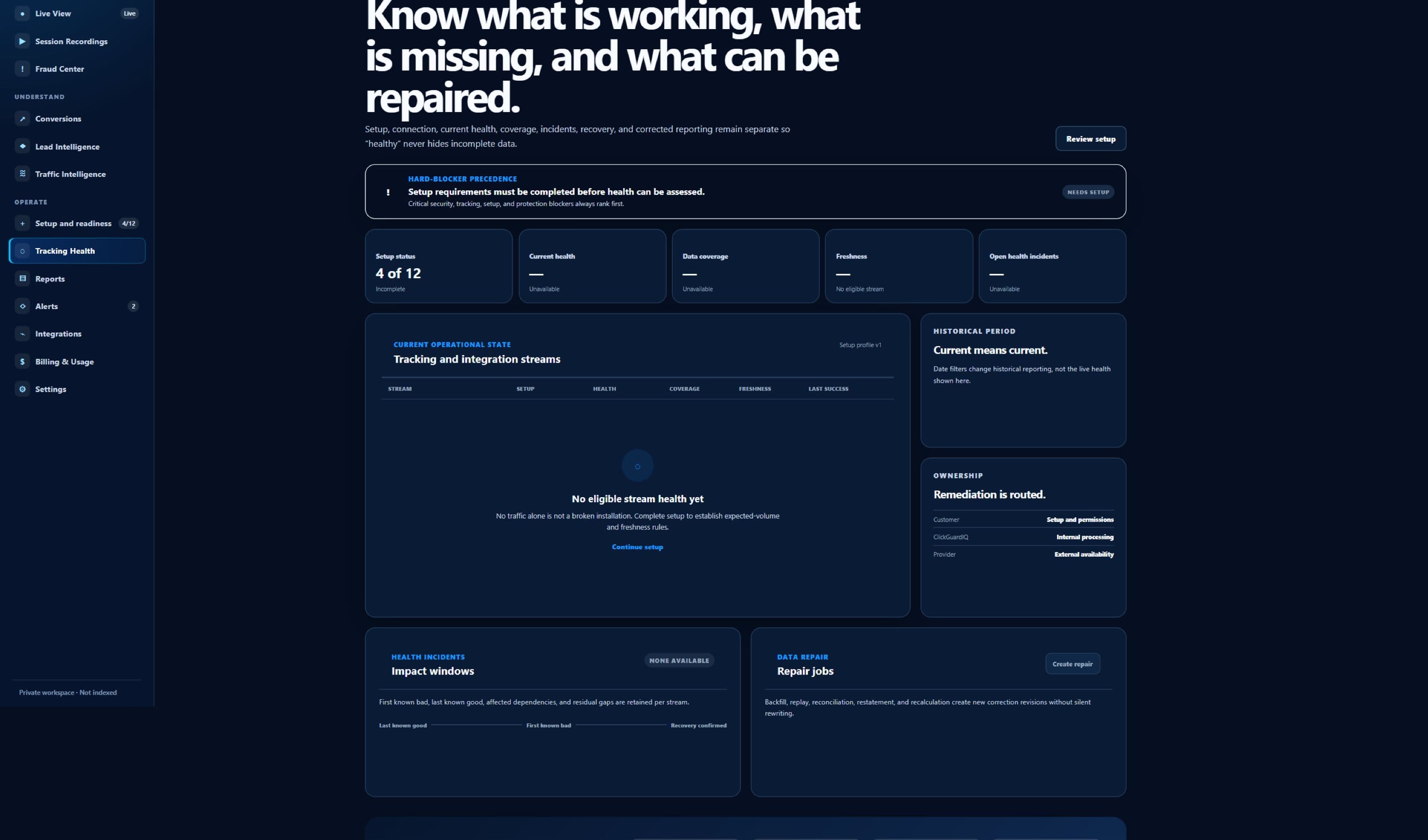
Sanitized beta interface — no customer data
Sanitized ClickGuardIQ Tracking Health workspace showing its current diagnostics state.
Tracking HealthCurrent beta interface captured without implying that a customer property has been tested.

Learn before deciding

ClickGuardIQ Documentation is organized around questions, evidence, and a responsible next step.

The resource exists to help a reader understand and evaluate—not to turn uncertainty into fear or disguise commercial claims as education.

What this resource helps readers do

The documentation hub routes users from prerequisites through configuration, privacy, validation, operational health, troubleshooting, recovery, and the strongest supported outcome for each released capability. The primary audience is website owners, administrators, developers, analysts, operators, agencies, privacy and security reviewers, and support teams configuring or operating ClickGuardIQ. Content begins with the reader's real task, defines the relevant terms, and identifies which product, provider, legal, privacy, or business decision remains outside the article or guide.

A useful answer explains the eligible evidence, population, grain, timeframe, geography where relevant, definition, method, uncertainty, limitations, and practical sequence. It also links to the workflow or product surface that owns the next operational question instead of repeating a generic conversion pitch.

  • Audience: website owners, administrators, developers, analysts, operators, agencies, privacy and security reviewers, and support teams configuring or operating ClickGuardIQ
  • Learning goal: The documentation hub routes users from prerequisites through configuration, privacy, validation, operational health, troubleshooting, recovery, and the strongest supported outcome for each released capability.
  • Boundary: Documentation describes current and planned behavior honestly; it does not make a draft interface, internal contract, plan entitlement, provider connection, or future roadmap generally available.

How evidence is handled

Product instructions are owned by supported versions and current capability status; external provider steps link to current primary provider documentation and identify provider-controlled behavior. Material factual claims should identify the publisher, source, relevant publication or update date, and the context in which the finding applies. Primary provider, standards, government, or original-method sources are preferred where available.

Task-oriented pages state prerequisites, required roles, scope, fields, expected states, validation, limitations, rollback or correction, and where to find health or audit evidence. Observed activity, calculated metrics, signals, risk, suspicion, policy classification, provider action, verification, estimates, credits, savings, conversion quality, and commercial outcomes retain different meanings throughout the resource family.

What the resource does not claim

Documentation describes current and planned behavior honestly; it does not make a draft interface, internal contract, plan entitlement, provider connection, or future roadmap generally available. A guide can help structure an evaluation, but it cannot confirm a specific visitor's intent, replace provider policy, create unavailable product capability, provide legal advice, or guarantee detection, blocking, savings, conversion, lead, revenue, or ROI outcomes.

Content states publication or modification context, visible limitations, related definitions, and the safest next step. If a material source, provider behavior, product capability, or interpretation changes, the correction should update the visible content and date without pretending the earlier publication never existed.

What you can learn

Explore the core areas within clickguardiq documentation.

Each pathway is specific enough to answer a reader question and broad enough to connect the answer to methodology, product, privacy, security, or implementation evidence.

Tracking installation

Install the versioned browser SDK, configure property and privacy scope, validate event creation and delivery, and read Tracking Health.

Learn more →

Properties and identity

Understand verified website scope, environments, anonymous identity, sessions, acquisition, consent, merge or split boundaries, and correction history.

Metrics and investigations

Use definitions, eligibility, population, filters, versions, confidence, coverage, incidents, evidence timelines, decisions, and corrections.

Protection workflows

Review capability, policy, permissions, approval, external request, provider response, verification, failure, expiry, reversal, and outcome review.

Integrations and developers

Check current readiness, provider or destination scope, credentials, schemas, fields, limits, health, webhooks, APIs, retries, recovery, and exit.

Security and troubleshooting

Apply roles, tenant boundaries, audit, secrets, privacy, retention, last trustworthy state, impact, remediation, validation, and escalation.

Start from the task

Choose a path based on what you need to understand or resolve.

Task-led navigation reduces guesswork and keeps definitions, evidence, limitations, and escalation context attached to the problem.

Complete an initial setup

Confirm prerequisites and authority, configure the smallest supported scope, test without customer impact, validate accepted evidence, and record current health.

Understand a field or status

Open the version-aware reference, identify entity grain, source, eligibility, timestamps, current and historical meaning, unavailable states, and related workflow.

Troubleshoot unexpected behavior

Start from the symptom and affected scope, identify the last trustworthy state, follow stage-specific diagnostics, preserve evidence, and validate remediation.

Plan an integration or automation

Review current availability, exact capabilities, scopes, permissions, schemas, provider ownership, limits, failure handling, verification, reversal, security, privacy, and support.

Evidence-aware learning path

Five stages for using clickguardiq documentation responsibly.

The sequence moves from the reader's question to source review, practical application, validation, and a documented next step without turning education into an unsupported verdict.

  1. 01

    Choose the exact task and version

    Identify product surface, website or client, environment, provider or destination, capability, user role, supported version, and desired verified outcome.

    A documentation topic can exist before the corresponding public production capability is generally available.
  2. 02

    Review prerequisites and boundaries

    Check ownership, permissions, consent, security, privacy, fields, schemas, data readiness, provider requirements, current status, unsupported needs, and rollback.

  3. 03

    Configure the minimum supported scope

    Apply explicit organization, client, website, environment, account, destination, field, purpose, role, capability, policy, and version settings.

  4. 04

    Validate observable stages

    Test configuration, authentication, permission, capture or sync, validation, acceptance, processing, health, action, provider response, verification, failure, and freshness as applicable.

  5. 05

    Operate and maintain safely

    Monitor health, limits, changes, versions, permissions, incidents, corrections, retries, expiry, reversal, rotation, revocation, retention, deletion, and escalation evidence.

Publication and product boundary

Know which evidence is published, current, external, limited, or planned.

Visible status helps readers distinguish finished educational material and product documentation from provider-controlled facts, planned capabilities, and unsupported outcomes.

Tracking SDKavailable

Available v0.1.0 documentation

The browser SDK page documents installation, consent behavior, safe event capture, delivery diagnostics, and server-acceptance boundaries.

Product documentationbeta

Versioned foundation

The hub defines task and reference standards while detailed pages expand only as capabilities and operational evidence become supported.

Provider instructionsexternal

Externally maintained

Google, GTM, WordPress, Slack, browsers, consent tools, and customer systems own their interfaces, policies, limits, changes, and availability.

Future capabilitieslimited

Not available by documentation alone

Planned integrations, APIs, webhooks, external actions, verification, and support commitments remain unavailable until explicitly implemented, validated, and released.

Quality review

Evaluate clickguardiq documentation by usefulness and evidence discipline.

The comparison describes editorial approaches; it does not make unsupported claims about every competing resource or publisher.

Evaluate clickguardiq documentation by usefulness and evidence discipline.
ComparisonFeature-list documentationTask-and-verification documentation
Entry pointOrganizes pages by internal component names and assumes the user knows where failure occurred.Starts from setup, field meaning, symptom, affected scope, desired outcome, role, environment, and current capability status.
InstructionsLists clicks and settings without prerequisites, privacy, permissions, versions, or expected states.States scope, authority, prerequisites, configuration, fields, validation, limitations, rollback, correction, and health evidence.
SuccessTreats enabled, published, connected, sent, or acknowledged as completed success.Separates configuration, authentication, permission, data flow, acceptance, processing, freshness, provider application, verification, and outcome.
TroubleshootingSuggests repeated setup changes without preserving evidence or data impact.Uses symptom, impact, last trustworthy state, diagnostics, safe remediation, validation, rollback, affected records, and escalation context.
MaintenanceLeaves screenshots and provider steps undated across product and API changes.Ties behavior to versions and readiness, uses current provider sources, documents changes, and corrects material instructions visibly.

Editorial and maintenance contract

A trustworthy resource remains inspectable after publication.

Authorship, review, dates, sources, limitations, corrections, internal links, and assistance safeguards travel with substantive content.

Sources and interpretation

A source is selected because it supports the specific nearby statement—not because its title contains the target keyword. The resource distinguishes what the source directly reports from ClickGuardIQ interpretation, product method, an illustrative example, or a recommendation for evaluation.

Statistics require extra context: publisher, original source, observation and publication dates, sample, geography, platform, eligibility, definition, method, uncertainty, and limitations. A narrow historical estimate must not become a global, current, or universal market fact through repetition.

  • Primary sources where available
  • Source findings separated from interpretation
  • Statistics retain sample, date, geography, and limitations

Authorship, assistance, and corrections

The ClickGuardIQ Editorial Team is a collective author identity for product, research, and editorial review. Named individuals should appear only when real reviewers approve publication and their role can be stated accurately. Automation may help organize drafts or check consistency but is never treated as evidence.

Material corrections should identify what changed, why it changed, the source or evidence reviewed, and the new modification date. Provider-specific instructions and product capability statements require rechecking because APIs, interfaces, policies, fields, permissions, and availability can change.

From learning to action

Internal links should help a reader move between precise definitions, research standards, practical guides, articles, methodology, product modules, integrations, privacy, security, pricing, and contact—without creating near-duplicate pages solely for search traffic.

The final action must match the reader's stage. Educational pages can point to another guide, a glossary definition, documentation, the relevant workflow, an integration-status review, or a beta fit review. They do not use instant purchase, public free-trial, automatic installation, or guaranteed-result language.

ClickGuardIQ Documentation questions

Clarify scope, evidence, maintenance, and the next useful path.

Answers are written for extraction by readers and answer systems while keeping qualification, limitations, and ownership visible.

Where should I start with ClickGuardIQ documentation?

Begin with the task: tracking installation, a product concept, investigation, integration status, developer planning, privacy or security review, or troubleshooting. The page should identify prerequisites, current availability, minimum scope, validation, limitations, and the next evidence check.

Does documentation mean a feature is available?

Not always. Documentation can describe a method, planned integration, draft contract, or current limitation. Each page must expose available, beta, planned, external, limited, or unsupported status and avoid configuration instructions that imply unreleased capability.

How are product versions handled?

Behavioral and technical instructions identify the supported version or current contract where relevant. Changes should document compatibility, migration, configuration impact, validation, rollback or correction, and the modification context for material updates.

How should I use troubleshooting instructions?

Record the symptom, start time, affected websites, clients, accounts, versions, providers, events or fields, last trustworthy state, current health, recent changes, correlation identifiers, and attempted steps before making broad changes.

Where are API credentials documented?

The public API remains planned. The developer page describes the required authentication, scope, schema, limits, errors, idempotency, webhooks, and change-policy foundation without claiming production credentials or endpoints are available.

How can I report unclear or incorrect documentation?

Use the editorial or support contact path with the page, version, environment, exact instruction, observed behavior, expected behavior, safe evidence, and impact. Material corrections update visible guidance and modification context after review.

Use the next resource that matches your question

Start with the documented task you can validate end to end.

Review the browser SDK installation and privacy boundary, or use the help center when an existing setup, integration, data flow, or product state needs attention.